You bring the history. We do the heavy lifting.
From your first call to launch day in five clear steps. Most schools are live in about 4–6 weeks, and we load your content for you.
What you need
- A wall, a power outlet and Wi-Fi
- Whatever records and photos you have
- About an hour for your kickoff call
No IT project. No one needs to scan everything first.
Not sure yet? Here’s how deciding works.
See it with your school.
A 30-minute demo, plus a free preview site in your school’s colors you can share with your principal or boosters.
See it on your wall.
Send a photo of the space and we’ll mock up the screen there.
Get a clear quote.
Software, hardware and any data entry are listed up front. Pay by card or purchase order. Need it approved or funded? See Plans & Pricing for the approval kit and funding options.
See Plans & Pricing
Five steps from “yes” to launch day.
You get one named project manager from day one. Steps 2, 3 and 4 happen at the same time, so nothing waits on the screen.
Step 1: Kickoff call
Meet your project manager and agree what launches first and when.
- We do
- Turn your goals into a plan: what goes first, which folders, target date.
- You do
- Bring your target date (induction night, homecoming, a new building) and pick a phase one.
- Time
- Book it the day you sign. About 1 hour.
Step 2: Send what you have
Drop your records into a shared folder. We organize, format and enter it.
- We do
- Data entry, photo cropping, plaque transcription, record clean-up.
- You do
- Share spreadsheets, photos, programs and plaque photos. Start small; add more anytime.
- Time
- First folders in about a week. Ongoing requests usually 24–48 hours.
Step 3: We design it
Your screen is built in your school colors, logo and mascot.
- We do
- Custom backgrounds, folder designs and motion graphics.
- You do
- Send your logo and brand colors, or tell us where to find them.
- Time
- Alongside step 2.
Step 4: The screen goes up
Hardware arrives ready to go. Mounting it is like mounting a TV.
- We do
- Help you choose the spot, ship a pre-loaded kit with the wall mount, and walk your team through setup.
- You do
- Have facilities mount it, plug it in and connect Wi-Fi or Ethernet.
- Time
- Ships 1–3 weeks after payment. About an hour to set up.
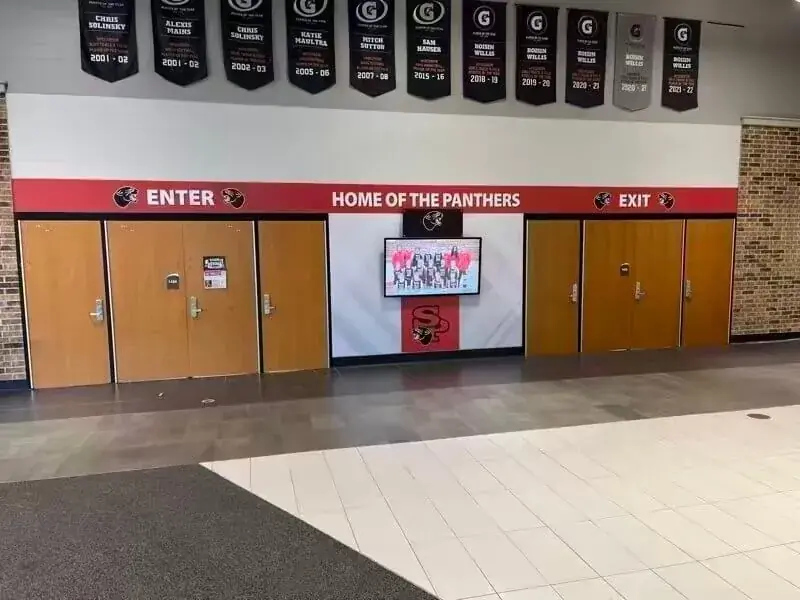
Stevens Point Area Senior High School, from Rocket’s installation gallery. Step 5: Check it and go live
You review everything, we train your staff and you launch.
- We do
- Train your editors and make your final changes.
- You do
- Check names, dates and photos, then plan your reveal.
- Time
- Live on the touchscreen, the web and a QR code the same day.
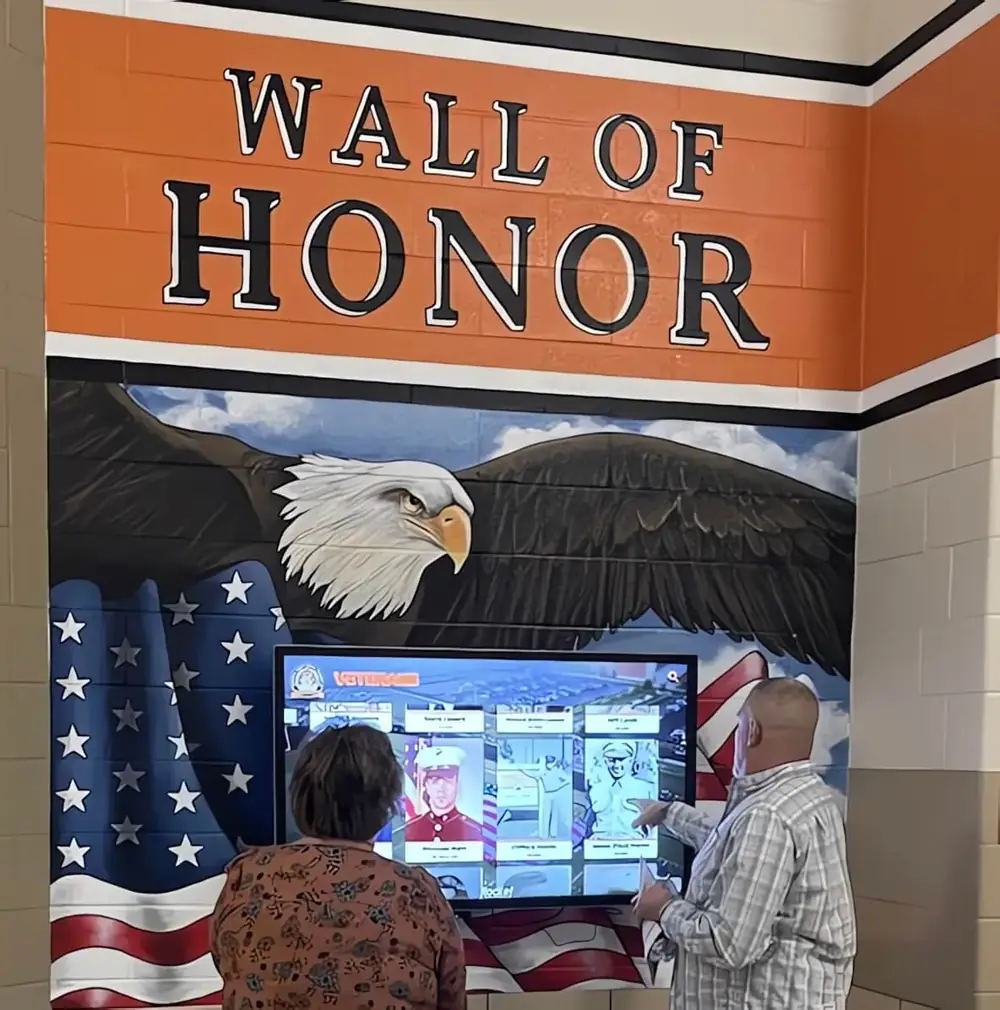
Seneca East High School’s Wall of Honor, from Rocket’s installation gallery.
Rather start with the software and add the screen later? You can.
Have a date in mind? Work back from it.
Most schools launch for a moment: an induction night, homecoming, a new building or an anniversary. Tell us the date at kickoff and we’ll plan back from it.
- Week 0Sign the quote. Book the kickoff call.
- Week 1Kickoff call. Share your first folder (current inductees, photos, the program).
- Weeks 1–3We enter and design it. The hardware ships.
- Weeks 3–4The screen goes up. You review the first folders.
- Weeks 4–6Staff training, final fixes, launch night. Earlier classes keep coming in after.
Illustrative. Timing depends on how much content is ready. Yearbooks that still need scanning take about 6 weeks door to door through our scanning partner, so send them early.
Send what you have. We’ll handle the rest.
| If you have… | Send us… |
|---|---|
| Spreadsheets or a list on your website | The file or the link |
| Plaques, trophies, banners, record boards | Phone photos. We transcribe the names. |
| Old photos, programs, clippings | Scans or phone photos, any format |
| Bound yearbooks | Digital copies, or ship them to our scanning partner (partner discount) Yearbook scanning partner |
| Nothing organized yet | Just tell us what exists. We’ll help you plan where to start. |
Samples are welcome, never required. Your team checks every entry before your community sees it.
Want the details? See the content guide →Launch day isn’t the end. It’s day one.
Your own project manager.
The same person from kickoff, plus 24/7 support from our Boston team. Live chat answers in seconds.
Updates without the work.
Add an inductee yourself in minutes, or send it to us through the portal, by email or by text, and it’s usually up within a day or two.
Changes show up everywhere.
The web updates instantly; the touchscreen syncs within about 15 minutes.
Built to last.
3-year hardware warranty and weekly software improvements at no extra cost.
Staff change? No problem.
Unlimited users, and we’ll train whoever takes over.
Questions schools ask
How long does it take?
Most schools are live in about 4–6 weeks. With your content ready, the first folders can be up within a week.
Do you install it?
You won’t need an installer. The screen comes with a wall mount and the Rocket app already loaded, so it goes up like a TV. Then you plug it in, connect to Wi-Fi and enter your site code. We’ll walk your team through it.
Do we need our IT department?
No IT project. It works on Wi-Fi or Ethernet. If your district needs security or accessibility documents, we’ll send them.
Who uploads all our history?
We do, as part of your plan, or your staff can do it themselves in an editor that works like PowerPoint. Most schools do both.
Do we have to gather everything first?
No. Start with one folder, like this year’s inductees, and add more over time.
Can we start before the screen arrives?
Yes. Your site is built and online before the screen arrives, and you can also order the hardware later.
Can we use a screen we already have?
Often, yes. See Plans & Pricing for existing-screen options.
What happens after launch?
You keep your project manager and 24/7 support. Updates are usually done within a day or two.
Do we need a multi-year contract?
No, plans are billed yearly.
Let’s plan your launch.
Bring your date and a photo of your wall. We’ll show you what it looks like and what the first six weeks would be.
