A digital yearbook archive alumni can open from anywhere
Yearbooks are often the most complete record a school has, but the copies sit on a library shelf few people visit. A digital yearbook archive lets students, families and alumni turn the pages on campus or from home.





Trusted by 1,500+ schools and organizations4.9/5 customer satisfaction
Schools and colleges that run on Rocket





Why it matters
The only copy of the 1962 yearbook is on a shelf
Old yearbooks wear out from handling, and some years exist as a single copy. Alumni who want to see their class have to visit during school hours. A move or a leaky roof puts the whole collection at risk.
Ideas for Digital Yearbook Archive
Every year you have
Start with the full run, then note the missing years so alumni can help fill gaps.
Page-turning on screen
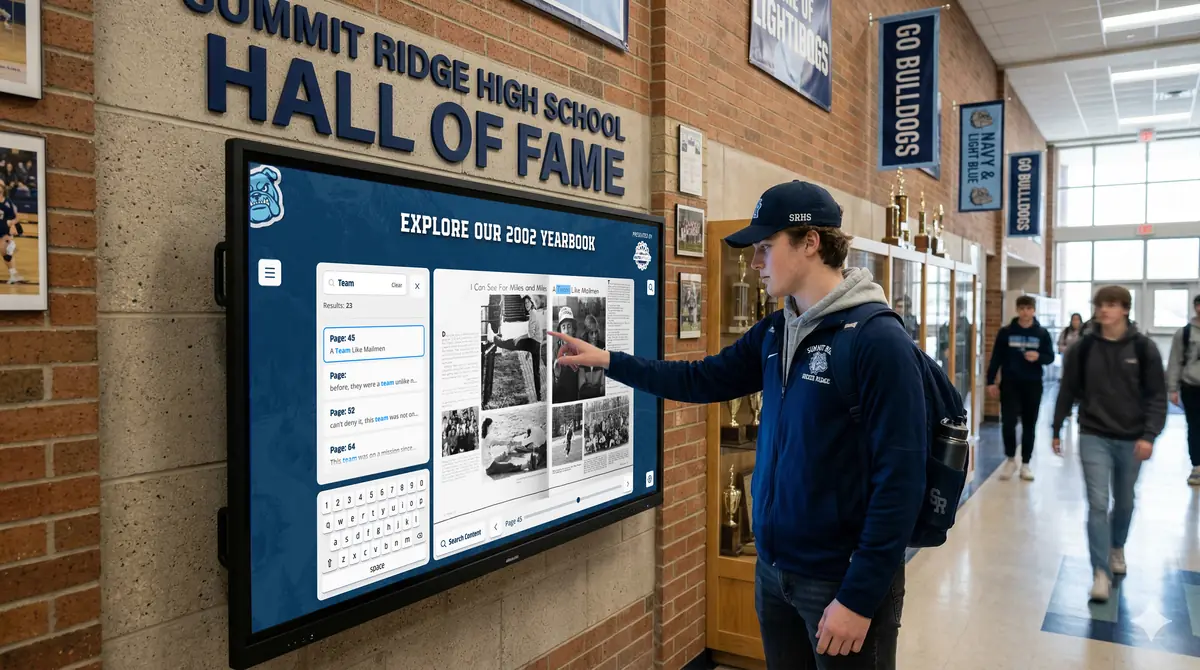
Visitors flip through each book on a touchscreen with page-turning animation.
Links and video in the pages
Enrich a yearbook with links and videos, such as a homecoming clip or a senior slideshow.
Embedded on your website
Embed the archive on your school or alumni site so people can find it without asking.
Connected to alumni profiles
Link a hall of fame inductee or notable graduate to their yearbook years.
Shared with reunion classes
Send the link to alumni and yearbook sponsors ahead of reunions.
How it works with History Showcase
Digital Yearbook Archive, step by step.
Three steps
Send books for scanning
Rocket offers yearbook scanning. Your books are scanned and returned, along with digital files ready for your Rocket platform.
Add yearbooks to your showcase
Staff upload the digitized yearbooks, or Rocket’s team helps with the upload.
Open the archive everywhere
The yearbooks can be viewed on a compatible touchscreen and on phones, tablets and computers through your website.
Setups vary by school; your demo confirms what yours will use.
Best practices
Tips to get it right.
Digital Yearbook Archive tips
Find every copy first
Check the library, the main office, the yearbook room and alumni before shipping anything.
Scan the best copy
Choose copies with the fewest torn pages and the least handwriting.
Ask alumni for missing years
Post a list of missing years and invite graduates to lend their copies.
Keep the originals safe
Store the physical books somewhere dry and stable once they are digitized.
Keep exploring
More History Showcase use cases
Questions
Digital Yearbook Archive questions
Rocket offers a yearbook scanning service for customers and non-customers. Your books are scanned and returned in the condition you sent them, with digital files ready for your showcase. Your demo confirms the steps for your collection.
Yes. Digital yearbooks can be viewed on a touchscreen in your building and online on any device. You can also embed them on your school website.
Rocket scans yearbooks, helps upload them and presents them in a page-turning experience inside your History Showcase. The yearbooks sit alongside your halls of fame, records and alumni stories.
Scanning and display are quoted for your school based on your collection and the setup you choose. Existing Rocket customers receive special pricing on yearbook scanning.
Your next step
Plan your History Showcase.
We'll walk through a real hall of fame and sketch the first collection your community could explore.
